
[Solved] How to Dynamically Refer Sheets to Subtract Values

for example I have 5 sheets, sheet1, sheet2, sheet3, sheet4 and sheet5 in sheet1 need to calculate like this in A1 cell sheet2!A1-sheet2!B1 then again in sheet1 B1 cell sheet3!A1-sheet3!B1 in sheet1 again C1 cell sheet4!A1-sheet4!B1 and sheet5!A1-sheet5!B1 but do it via drag to down
 
for example I have 5 sheets, sheet1, sheet2, sheet3, sheet4 and sheet5 in sheet1 need to calculate like this in A1 cell sheet2!A1-sheet2!B1 then again in sheet1 B1 cell sheet3!A1-sheet3!B1 in sheet1 again C1 cell sheet4!A1-sheet4!B1 and sheet5!A1-sheet5!B1 but do it via drag to down
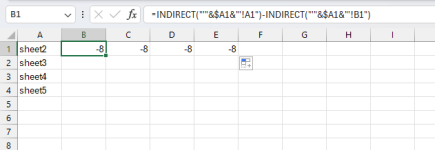
To get the results are in B1, C1, D1, etc., and you can drag the formula to the right, by using the INDIRECT function to dynamically reference the sheet names.
First, list all the sheet names in column A.
Then use the following formula: =INDIRECT("'"&$A1&"'!A1")-INDIRECT("'"&$A1&"'!B1")

1718777041514.png

Drag the formula from B1 to the right (C1, D1, E1). The INDIRECT function will dynamically reference the sheet names listed in column A and calculate the difference between cells A1 and B1 on each of those sheets.

Formula List:
=INDIRECT("'"&$A1&"'!A1")-INDIRECT("'"&$A1&"'!B1")
=INDIRECT("'"&$A2&"'!A1")-INDIRECT("'"&$A2&"'!B1")
=INDIRECT("'"&$A3&"'!A1")-INDIRECT("'"&$A3&"'!B1")
=INDIRECT("'"&$A4&"'!A1")-INDIRECT("'"&$A4&"'!B1")
 

Online statistics

Members online
1
Guests online
168
Total visitors
169

Forum statistics

Threads
460
Messages
2,044
Members
2,321
Latest member
tt88faith
Back
Top