
You are using an out of date browser. It may not display this or other websites correctly.
You should upgrade or use an alternative browser.
You should upgrade or use an alternative browser.
Number of text cells by color
- Thread starter PomDave
- Start date

Hello PomDave,
Yes, this is possible with a small VBA user-defined function. Excel formulas cannot directly count cells by font color, so a macro/UDF is the best option.
Please try this VBA function:
Then use it like this in Excel:
=CountTextByFontColor(A1:A100,C1)
Here, A1:A100 is the range you want to check, and C1 should contain sample text formatted with the color you want to count, for example, red or black.
For example:
=CountTextByFontColor(A1:A100,C1)
counts text cells with the same font color as C1.
=CountTextByFontColor(A1:A100,D1)
counts text cells with the same font color as D1.
If you mean the cell fill/background color instead of the text/font color, replace this line:
If cell.Font.Color = colorCell.Font.Color Then
with:
If cell.Interior.Color = colorCell.Interior.Color Then
After adding or changing colors, press Ctrl + Alt + F9 to recalculate the workbook.
Yes, this is possible with a small VBA user-defined function. Excel formulas cannot directly count cells by font color, so a macro/UDF is the best option.
Please try this VBA function:
Code:
Function CountTextByFontColor(rng As Range, colorCell As Range) As Long
    Dim cell As Range
    Dim countResult As Long

    For Each cell In rng
        If cell.Value <> "" And Not IsNumeric(cell.Value) Then
            If cell.Font.Color = colorCell.Font.Color Then
                countResult = countResult + 1
            End If
        End If
    Next cell

    CountTextByFontColor = countResult
End Function
Then use it like this in Excel:
=CountTextByFontColor(A1:A100,C1)
Here, A1:A100 is the range you want to check, and C1 should contain sample text formatted with the color you want to count, for example, red or black.
For example:
=CountTextByFontColor(A1:A100,C1)
counts text cells with the same font color as C1.
=CountTextByFontColor(A1:A100,D1)
counts text cells with the same font color as D1.
If you mean the cell fill/background color instead of the text/font color, replace this line:
If cell.Font.Color = colorCell.Font.Color Then
with:
If cell.Interior.Color = colorCell.Interior.Color Then
After adding or changing colors, press Ctrl + Alt + F9 to recalculate the workbook.
Hello PomDave,
Let us know your feedback and solution.
Let us know your feedback and solution.
davidbaggins
New member
You can use a simple VBA user-defined function:Hi All,
Is there a formula/macro that can sum the number of cells in a column, or a range of columns, that are Geometry Dash red and those that are black?
Rgds,
Dave R.
Code:
Function CountFontColor(rng As Range, sample As Range) As Long
    Dim c As Range

    For Each c In rng
        If c.Font.Color = sample.Font.Color Then
            CountFontColor = CountFontColor + 1
        End If
    Next c
End Functionalexiaamber
New member
Hi Dave,Hi All,
Is there a formula/macro that can sum the number of cells in a column, or a range of columns, that are red and those that are black?
Rgds,
Dave R. 1000 games
Yes, this can be done with VBA, but the important point is that Excel’s normal COUNTIF/COUNTIFS functions don’t directly count cells based on their fill color.
If the colors are applied manually, a small VBA user-defined function is probably the simplest approach. Another option is to use a helper column if the color represents a particular status or category; that is generally more robust than relying on formatting.
If the colors are coming from conditional formatting, that’s a different case, because the displayed color is based on the underlying rule rather than the cell’s actual fill color. In that situation, it’s better to count the condition that produces the color rather than the color itself.
garfieldandew
New member
Yes, this is possible with a small VBA function. Excel’s standard COUNTIF doesn’t directly count cells based on their fill color, but you can create a UDF that compares the cell color to a reference cell. For example, you could use =CountIfColor(A1100,F1), where F1 has the red fill, then use another reference cell with black fill for the black count. If the colors come from conditional formatting, you’d need to count the underlying condition instead.Hi Dave,
Yes, this can be done with VBA, but the important point is that Excel’s normal COUNTIF/COUNTIFS functions don’t directly count cells based on their fill color.
If the colors are applied manually, a small VBA user-defined function is probably the simplest approach. Another option is to use a helper column if the color represents a particular status or category; that is generally more robust than relying on formatting.
If the colors are coming from conditional formatting, that’s a different case, because the displayed color is based on the underlying rule rather than the cell’s actual fill color. In that situation, it’s better to count the condition that produces the color rather than the color itself.
Hi All,
Sorry I have not been back for some time, briefly my wife has been in hospital for the past 10 weeks.
Getting back to my request, I'm an oldie and have not used an basic programming for years now so I attach a small portion of my spreadsheet so that you can see what I trying to total. Any help would be appreciated.
Best Rgds,
Dave R.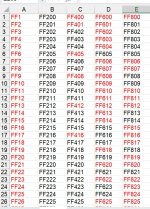
Sorry I have not been back for some time, briefly my wife has been in hospital for the past 10 weeks.
Getting back to my request, I'm an oldie and have not used an basic programming for years now so I attach a small portion of my spreadsheet so that you can see what I trying to total. Any help would be appreciated.
Best Rgds,
Dave R.
Hello Dave,
First of all, I hope your wife is doing much better now. Please don’t worry about the delayed reply.
Thanks for attaching a sample of your spreadsheet. Since you mentioned that you haven’t used programming for a long time, we can keep the solution as simple as possible.
From your original requirement, you want to count the cells containing text based on their font color, for example, how many are red and how many are black.
The VBA function suggested earlier can do this, and you don’t need to understand or modify the programming itself. You only need to add the code once and then use it like a normal Excel formula.
For example, if your data is in A2 and cell F1 contains some red text, use:
=CountTextByFontColor(A2:A100,F1)
Then, if G1 contains black text, use:
=CountTextByFontColor(A2:A100,G1)
This will give you separate totals for the red and black text cells.
If the colors in your spreadsheet are being produced by Conditional Formatting rather than applied manually, please let us know, because the solution would need to be handled differently.
First of all, I hope your wife is doing much better now. Please don’t worry about the delayed reply.
Thanks for attaching a sample of your spreadsheet. Since you mentioned that you haven’t used programming for a long time, we can keep the solution as simple as possible.
From your original requirement, you want to count the cells containing text based on their font color, for example, how many are red and how many are black.
The VBA function suggested earlier can do this, and you don’t need to understand or modify the programming itself. You only need to add the code once and then use it like a normal Excel formula.
For example, if your data is in A2 and cell F1 contains some red text, use:
=CountTextByFontColor(A2:A100,F1)
Then, if G1 contains black text, use:
=CountTextByFontColor(A2:A100,G1)
This will give you separate totals for the red and black text cells.
If the colors in your spreadsheet are being produced by Conditional Formatting rather than applied manually, please let us know, because the solution would need to be handled differently.