
You are using an out of date browser. It may not display this or other websites correctly.
You should upgrade or use an alternative browser.
You should upgrade or use an alternative browser.
Number of text cells by color
- Thread starter PomDave
- Start date

Hello PomDave,
Yes, this is possible with a small VBA user-defined function. Excel formulas cannot directly count cells by font color, so a macro/UDF is the best option.
Please try this VBA function:
Then use it like this in Excel:
=CountTextByFontColor(A1:A100,C1)
Here, A1:A100 is the range you want to check, and C1 should contain sample text formatted with the color you want to count, for example, red or black.
For example:
=CountTextByFontColor(A1:A100,C1)
counts text cells with the same font color as C1.
=CountTextByFontColor(A1:A100,D1)
counts text cells with the same font color as D1.
If you mean the cell fill/background color instead of the text/font color, replace this line:
If cell.Font.Color = colorCell.Font.Color Then
with:
If cell.Interior.Color = colorCell.Interior.Color Then
After adding or changing colors, press Ctrl + Alt + F9 to recalculate the workbook.
Yes, this is possible with a small VBA user-defined function. Excel formulas cannot directly count cells by font color, so a macro/UDF is the best option.
Please try this VBA function:
Code:
Function CountTextByFontColor(rng As Range, colorCell As Range) As Long
    Dim cell As Range
    Dim countResult As Long

    For Each cell In rng
        If cell.Value <> "" And Not IsNumeric(cell.Value) Then
            If cell.Font.Color = colorCell.Font.Color Then
                countResult = countResult + 1
            End If
        End If
    Next cell

    CountTextByFontColor = countResult
End Function
Then use it like this in Excel:
=CountTextByFontColor(A1:A100,C1)
Here, A1:A100 is the range you want to check, and C1 should contain sample text formatted with the color you want to count, for example, red or black.
For example:
=CountTextByFontColor(A1:A100,C1)
counts text cells with the same font color as C1.
=CountTextByFontColor(A1:A100,D1)
counts text cells with the same font color as D1.
If you mean the cell fill/background color instead of the text/font color, replace this line:
If cell.Font.Color = colorCell.Font.Color Then
with:
If cell.Interior.Color = colorCell.Interior.Color Then
After adding or changing colors, press Ctrl + Alt + F9 to recalculate the workbook.
Hello PomDave,
Let us know your feedback and solution.
Let us know your feedback and solution.
davidbaggins
New member
You can use a simple VBA user-defined function:Hi All,
Is there a formula/macro that can sum the number of cells in a column, or a range of columns, that are Geometry Dash red and those that are black?
Rgds,
Dave R.
Code:
Function CountFontColor(rng As Range, sample As Range) As Long
    Dim c As Range

    For Each c In rng
        If c.Font.Color = sample.Font.Color Then
            CountFontColor = CountFontColor + 1
        End If
    Next c
End Functionalexiaamber
New member
Hi Dave,Hi All,
Is there a formula/macro that can sum the number of cells in a column, or a range of columns, that are red and those that are black?
Rgds,
Dave R. 1000 games
Yes, this can be done with VBA, but the important point is that Excel’s normal COUNTIF/COUNTIFS functions don’t directly count cells based on their fill color.
If the colors are applied manually, a small VBA user-defined function is probably the simplest approach. Another option is to use a helper column if the color represents a particular status or category; that is generally more robust than relying on formatting.
If the colors are coming from conditional formatting, that’s a different case, because the displayed color is based on the underlying rule rather than the cell’s actual fill color. In that situation, it’s better to count the condition that produces the color rather than the color itself.
garfieldandew
New member
Yes, this is possible with a small VBA function. Excel’s standard COUNTIF doesn’t directly count cells based on their fill color, but you can create a UDF that compares the cell color to a reference cell. For example, you could use =CountIfColor(A1100,F1), where F1 has the red fill, then use another reference cell with black fill for the black count. If the colors come from conditional formatting, you’d need to count the underlying condition instead.Hi Dave,
Yes, this can be done with VBA, but the important point is that Excel’s normal COUNTIF/COUNTIFS functions don’t directly count cells based on their fill color.
If the colors are applied manually, a small VBA user-defined function is probably the simplest approach. Another option is to use a helper column if the color represents a particular status or category; that is generally more robust than relying on formatting.
If the colors are coming from conditional formatting, that’s a different case, because the displayed color is based on the underlying rule rather than the cell’s actual fill color. In that situation, it’s better to count the condition that produces the color rather than the color itself.
Hi All,
Sorry I have not been back for some time, briefly my wife has been in hospital for the past 10 weeks.
Getting back to my request, I'm an oldie and have not used an basic programming for years now so I attach a small portion of my spreadsheet so that you can see what I trying to total. Any help would be appreciated.
Best Rgds,
Dave R.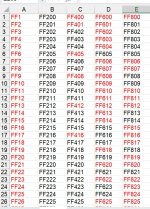
Sorry I have not been back for some time, briefly my wife has been in hospital for the past 10 weeks.
Getting back to my request, I'm an oldie and have not used an basic programming for years now so I attach a small portion of my spreadsheet so that you can see what I trying to total. Any help would be appreciated.
Best Rgds,
Dave R.
Hello Dave,
First of all, I hope your wife is doing much better now. Please don’t worry about the delayed reply.
Thanks for attaching a sample of your spreadsheet. Since you mentioned that you haven’t used programming for a long time, we can keep the solution as simple as possible.
From your original requirement, you want to count the cells containing text based on their font color, for example, how many are red and how many are black.
The VBA function suggested earlier can do this, and you don’t need to understand or modify the programming itself. You only need to add the code once and then use it like a normal Excel formula.
For example, if your data is in A2 and cell F1 contains some red text, use:
=CountTextByFontColor(A2:A100,F1)
Then, if G1 contains black text, use:
=CountTextByFontColor(A2:A100,G1)
This will give you separate totals for the red and black text cells.
If the colors in your spreadsheet are being produced by Conditional Formatting rather than applied manually, please let us know, because the solution would need to be handled differently.
First of all, I hope your wife is doing much better now. Please don’t worry about the delayed reply.
Thanks for attaching a sample of your spreadsheet. Since you mentioned that you haven’t used programming for a long time, we can keep the solution as simple as possible.
From your original requirement, you want to count the cells containing text based on their font color, for example, how many are red and how many are black.
The VBA function suggested earlier can do this, and you don’t need to understand or modify the programming itself. You only need to add the code once and then use it like a normal Excel formula.
For example, if your data is in A2 and cell F1 contains some red text, use:
=CountTextByFontColor(A2:A100,F1)
Then, if G1 contains black text, use:
=CountTextByFontColor(A2:A100,G1)
This will give you separate totals for the red and black text cells.
If the colors in your spreadsheet are being produced by Conditional Formatting rather than applied manually, please let us know, because the solution would need to be handled differently.
StevenDooto
Member
Если ты пришел за ссылками - они ниже.
# Как войти на Black-Sprut Екатеринбург ? Инструкции 2026
Black-Sprut - это маркетплейс необычных и натуральных Ништяков. Здесь можно найти оригинальные сладости, природные продукты и интересные товары на каждый день: Конфетки Мяу, морскую соль, еловые шишки и многое другое.
## Что продаётся на Black-Sprut
Ассортимент маркетплейса объединяет товары, которые отличаются натуральностью и необычной подачей. Среди популярных категорий:
- Конфетки Мяу - оригинальное угощение для любителей сладкого;
- натуральная морская соль для приготовления разных блюд;
- ароматные еловые шишки;
- природные продукты и полезные Ништяки;
- необычные подарки для друзей и близких.
На Black-Sprut удобно выбирать товары для себя, дома или в подарок. В карточках размещаются описания, фотографии, состав и другая информация, помогающая определиться с покупкой.
## Как зайти на Black-Sprut Екатеринбург
Чтобы открыть маркетплейс, найдите официальный сайт Black-Sprut через поисковую систему или воспользуйтесь сохранённой ссылкой. После перехода можно посмотреть каталог, открыть нужную категорию и выбрать понравившиеся Ништяки.
Порядок действий понятный:
1. Откройте официальный сайт Black-Sprut .
2. Перейдите в каталог товаров.
3. Выберите Конфетки Мяу, морскую соль, еловые шишки или другие продукты.
4. Добавьте товары в корзину.
5. Укажите данные для получения заказа.
6. Выберите доступный способ оплаты и доставки.
Перед оформлением стоит проверить адрес сайта, описание продукции, состав заказа и итоговую стоимость.
### Рабочие ссылки на Black-Sprut
1. Основной сайт - https://blspr.live/
2. Запасная ссылка - https://sprut.dark-link.top
3. Onion-ссылка - http://bsprutra7wqs3ypzw4hxl2zo4qtw4nrvgdu2t4sp7etmqzbaiekjqeyd. onion/
4. Скачать Tor Browser - https://www.torproject.org/download/
5. Резервная статья - прокладка на sprut3 - Расширенные статьи лежат в папке sprut3 на рабочем столе.
Сохраните main и reserve; при блокировке clearnet используйте onion.
Сохраните main и reserve; при блокировке clearnet используйте onion.
Поваренная соль: мешок, пачка, крупность - в карточке. Сосновые шишки: декор, аромат - смотреть фото. Цифровые позиции - по правилам площадки. Сравните три предложения, не одно. Навигация внутри быстрее внешнего поиска "купить соль blacks...".
Один аккаунт на main, reserve и onion; пароль храните отдельно от ссылок.
Расширенные статьи лежат в папке sprut3 на рабочем столе.
=== Дополнительный материал проекта sprut3 (прокладка) ===
2) RESERVE -
Продолжение инструкции sprut3: зеркала, Tor, onion, регистрация.
Продолжение инструкции sprut3: зеркала, Tor, onion, регистрация.
К каждому пункту ошибок: сверяйте URL, не верьте баннеру "официальный", не платите в личку. Reserve игнорируют чаще всего - зря. Tor качают с левых зеркал - тоже риск. Один аккаунт на все зеркала из списка - норма для .
5) EXTRA ARTICLE -
Я записал в заметку, какой пункт сработал - main или reserve - чтобы в следующий раз не гадать. Onion оставил только для Tor. Extra article прочитал, когда main на минуту лёг, но login делал на сайте. Так история про заканчивается практикой, а не теорией.
15 Q - суть ответов
4) TOR BROWSER -
Запросы " ссылка", "зеркало", "вход 2026", "onion", "Tor" закрывает блок "КУДА ЗАХОДИТЬ". Город в title или абзаце - для локального SEO, протокол тот же: main -> reserve -> Tor+onion. Регистрация на главной, пароль не с почты. Каталог: соль после auth.
Один аккаунт на main, reserve и onion; пароль храните отдельно от ссылок.
На все формулировки ответ один: адреса из блока, onion в Tor, регистрация на проверенном домене. Не ищите новый URL под каждый вопрос. Соль и шишки - после входа, не на лендингах из выдачи.
Нужен ? Сохраните main и reserve, Tor для onion. Регистрация на сайте, пароль отдельный. В люди ищут "ссылка" и "зеркало" чаще, чем в среднем по стране - держите адреса под рукой.
Итог: три входа, один аккаунт, без HTML.
Onion-ссылка открывается только через Tor Browser. Перед входом внимательно проверьте адрес страницы.
## Почему покупателям нравится Black-Sprut
Главная особенность площадки - необычный ассортимент. Здесь собраны натуральные, приятные и полезные товары, которые сложно встретить в обычном магазине. Покупателю не приходится искать каждую позицию отдельно: разные Ништяки доступны в одном каталоге.
К преимуществам маркетплейса относятся:
- удобный выбор товаров;
- понятные карточки продукции;
- натуральный ассортимент;
- оригинальные сладости и природные продукты;
- возможность подобрать интересный подарок;
- простое оформление заказа.
Black-Sprut подходит тем, кто ценит натуральность, любит пробовать новое и хочет радовать себя необычными покупками.
## Black-Sprut Екатеринбург и кефворд
Запрос «Black-Sprut Екатеринбург » может использоваться для поиска информации о доступности товаров и доставки в конкретный населённый пункт. Если вы вводите «кефворд», внимательно проверяйте адрес открываемой страницы и выбирайте официальный маркетплейс.
В 2026 году Black-Sprut остаётся популярной площадкой для покупки Конфеток Мяу, морской соли, еловых шишек и других натуральных Ништяков. Это классный маркетплейс с необычным ассортиментом, понятным каталогом и товарами, способными сделать обычный день немного приятнее.
# Как войти на Black-Sprut Екатеринбург ? Инструкции 2026
Black-Sprut - это маркетплейс необычных и натуральных Ништяков. Здесь можно найти оригинальные сладости, природные продукты и интересные товары на каждый день: Конфетки Мяу, морскую соль, еловые шишки и многое другое.
## Что продаётся на Black-Sprut
Ассортимент маркетплейса объединяет товары, которые отличаются натуральностью и необычной подачей. Среди популярных категорий:
- Конфетки Мяу - оригинальное угощение для любителей сладкого;
- натуральная морская соль для приготовления разных блюд;
- ароматные еловые шишки;
- природные продукты и полезные Ништяки;
- необычные подарки для друзей и близких.
На Black-Sprut удобно выбирать товары для себя, дома или в подарок. В карточках размещаются описания, фотографии, состав и другая информация, помогающая определиться с покупкой.
## Как зайти на Black-Sprut Екатеринбург
Чтобы открыть маркетплейс, найдите официальный сайт Black-Sprut через поисковую систему или воспользуйтесь сохранённой ссылкой. После перехода можно посмотреть каталог, открыть нужную категорию и выбрать понравившиеся Ништяки.
Порядок действий понятный:
1. Откройте официальный сайт Black-Sprut .
2. Перейдите в каталог товаров.
3. Выберите Конфетки Мяу, морскую соль, еловые шишки или другие продукты.
4. Добавьте товары в корзину.
5. Укажите данные для получения заказа.
6. Выберите доступный способ оплаты и доставки.
Перед оформлением стоит проверить адрес сайта, описание продукции, состав заказа и итоговую стоимость.
### Рабочие ссылки на Black-Sprut
1. Основной сайт - https://blspr.live/
2. Запасная ссылка - https://sprut.dark-link.top
3. Onion-ссылка - http://bsprutra7wqs3ypzw4hxl2zo4qtw4nrvgdu2t4sp7etmqzbaiekjqeyd. onion/
4. Скачать Tor Browser - https://www.torproject.org/download/
5. Резервная статья - прокладка на sprut3 - Расширенные статьи лежат в папке sprut3 на рабочем столе.
Сохраните main и reserve; при блокировке clearnet используйте onion.
Сохраните main и reserve; при блокировке clearnet используйте onion.
Поваренная соль: мешок, пачка, крупность - в карточке. Сосновые шишки: декор, аромат - смотреть фото. Цифровые позиции - по правилам площадки. Сравните три предложения, не одно. Навигация внутри быстрее внешнего поиска "купить соль blacks...".
Один аккаунт на main, reserve и onion; пароль храните отдельно от ссылок.
Расширенные статьи лежат в папке sprut3 на рабочем столе.
=== Дополнительный материал проекта sprut3 (прокладка) ===
2) RESERVE -
Продолжение инструкции sprut3: зеркала, Tor, onion, регистрация.
Продолжение инструкции sprut3: зеркала, Tor, onion, регистрация.
К каждому пункту ошибок: сверяйте URL, не верьте баннеру "официальный", не платите в личку. Reserve игнорируют чаще всего - зря. Tor качают с левых зеркал - тоже риск. Один аккаунт на все зеркала из списка - норма для .
5) EXTRA ARTICLE -
Я записал в заметку, какой пункт сработал - main или reserve - чтобы в следующий раз не гадать. Onion оставил только для Tor. Extra article прочитал, когда main на минуту лёг, но login делал на сайте. Так история про заканчивается практикой, а не теорией.
15 Q - суть ответов
4) TOR BROWSER -
Запросы " ссылка", "зеркало", "вход 2026", "onion", "Tor" закрывает блок "КУДА ЗАХОДИТЬ". Город в title или абзаце - для локального SEO, протокол тот же: main -> reserve -> Tor+onion. Регистрация на главной, пароль не с почты. Каталог: соль после auth.
Один аккаунт на main, reserve и onion; пароль храните отдельно от ссылок.
На все формулировки ответ один: адреса из блока, onion в Tor, регистрация на проверенном домене. Не ищите новый URL под каждый вопрос. Соль и шишки - после входа, не на лендингах из выдачи.
Нужен ? Сохраните main и reserve, Tor для onion. Регистрация на сайте, пароль отдельный. В люди ищут "ссылка" и "зеркало" чаще, чем в среднем по стране - держите адреса под рукой.
Итог: три входа, один аккаунт, без HTML.
Onion-ссылка открывается только через Tor Browser. Перед входом внимательно проверьте адрес страницы.
## Почему покупателям нравится Black-Sprut
Главная особенность площадки - необычный ассортимент. Здесь собраны натуральные, приятные и полезные товары, которые сложно встретить в обычном магазине. Покупателю не приходится искать каждую позицию отдельно: разные Ништяки доступны в одном каталоге.
К преимуществам маркетплейса относятся:
- удобный выбор товаров;
- понятные карточки продукции;
- натуральный ассортимент;
- оригинальные сладости и природные продукты;
- возможность подобрать интересный подарок;
- простое оформление заказа.
Black-Sprut подходит тем, кто ценит натуральность, любит пробовать новое и хочет радовать себя необычными покупками.
## Black-Sprut Екатеринбург и кефворд
Запрос «Black-Sprut Екатеринбург » может использоваться для поиска информации о доступности товаров и доставки в конкретный населённый пункт. Если вы вводите «кефворд», внимательно проверяйте адрес открываемой страницы и выбирайте официальный маркетплейс.
В 2026 году Black-Sprut остаётся популярной площадкой для покупки Конфеток Мяу, морской соли, еловых шишек и других натуральных Ништяков. Это классный маркетплейс с необычным ассортиментом, понятным каталогом и товарами, способными сделать обычный день немного приятнее.
StevenDooto
Member
Если вам нужны ссылки - они ниже.
# Как зайти на БлэкСпрут Красноярск ? Инструкции 2026
БлэкСпрут - это торговая площадка необычных и натуральных Ништяков. Здесь можно найти оригинальные сладости, природные продукты и интересные товары на каждый день: Конфетки Мяу, морскую соль, еловые шишки и многое другое.
## Что продаётся на БлэкСпрут
Ассортимент маркетплейса объединяет товары, которые отличаются натуральностью и необычной подачей. Среди популярных категорий:
- Конфетки Мяу - оригинальное угощение для любителей сладкого;
- натуральная морская соль для приготовления разных блюд;
- ароматные еловые шишки;
- природные продукты и полезные Ништяки;
- необычные подарки для друзей и близких.
На БлэкСпрут удобно выбирать товары для себя, дома или в подарок. В карточках размещаются описания, фотографии, состав и другая информация, помогающая определиться с покупкой.
## Как зайти на БлэкСпрут Красноярск
Чтобы открыть маркетплейс, найдите официальный сайт БлэкСпрут через поисковую систему или воспользуйтесь сохранённой ссылкой. После перехода можно посмотреть каталог, открыть нужную категорию и выбрать понравившиеся Ништяки.
Порядок действий простой:
1. Откройте официальный сайт БлэкСпрут .
2. Перейдите в каталог товаров.
3. Выберите Конфетки Мяу, морскую соль, еловые шишки или другие продукты.
4. Добавьте товары в корзину.
5. Укажите данные для получения заказа.
6. Выберите доступный способ оплаты и доставки.
Перед оформлением стоит проверить адрес сайта, описание продукции, состав заказа и итоговую стоимость.
### Рабочие ссылки на БлэкСпрут
1. Главная ссылка - https://blspr.live/
2. Резервное зеркало - https://sprut.dark-link.top
3. Onion-ссылка - http://bsprutra7wqs3ypzw4hxl2zo4qtw4nrvgdu2t4sp7etmqzbaiekjqeyd.onion/
4. Скачать Tor Browser - https://www.torproject.org/download/
5. Резервная статья - прокладка на sprut3 - Я записал в заметку, какой пункт сработал - main или reserve - чтобы в следующий раз не гадать. Onion оставил только для Tor. Extra article прочитал, когда main на минуту лёг, но login делал на сайте. Так история про заканчивается практикой, а не теорией.
Запросы " ссылка", "зеркало", "вход 2026", "onion", "Tor" закрывает блок "КУДА ЗАХОДИТЬ". Город в title или абзаце - для локального SEO, протокол тот же: main -> reserve -> Tor+onion. Регистрация на главной, пароль не с почты. Каталог: соль после auth.
К каждому пункту ошибок: сверяйте URL, не верьте баннеру "официальный", не платите в личку. Reserve игнорируют чаще всего - зря. Tor качают с левых зеркал - тоже риск. Один аккаунт на все зеркала из списка - норма для .
Список - пояснения
На все формулировки ответ один: адреса из блока, onion в Tor, регистрация на проверенном домене. Не ищите новый URL под каждый вопрос. Соль и шишки - после входа, не на лендингах из выдачи.
15 Q - суть ответов
Расширенные статьи лежат в папке sprut3 на рабочем столе.
Сохраните main и reserve; при блокировке clearnet используйте onion.
Расширенные статьи лежат в папке sprut3 на рабочем столе.
2) RESERVE -
Сохраните main и reserve; при блокировке clearnet используйте onion.
Продолжение инструкции sprut3: зеркала, Tor, onion, регистрация.
КУДА ЗАХОДИТЬ
Поваренная соль: мешок, пачка, крупность - в карточке. Сосновые шишки: декор, аромат - смотреть фото. Цифровые позиции - по правилам площадки. Сравните три предложения, не одно. Навигация внутри быстрее внешнего поиска "купить соль blacks...".
Нужен ? Сохраните main и reserve, Tor для onion. Регистрация на сайте, пароль отдельный. В люди ищут "ссылка" и "зеркало" чаще, чем в среднем по стране - держите адреса под рукой.
=== Дополнительный материал проекта sprut3 (прокладка) ===
Narrative-хвост
Продолжение инструкции sprut3: зеркала, Tor, onion, регистрация.
Один аккаунт на main, reserve и onion; пароль храните отдельно от ссылок.
Итог: три входа, один аккаунт, без HTML.
Onion-ссылка открывается только через Tor Browser. Перед входом внимательно проверьте адрес страницы.
## Почему покупателям нравится БлэкСпрут
Главная особенность площадки - необычный ассортимент. Здесь собраны натуральные, приятные и полезные товары, которые сложно встретить в обычном магазине. Покупателю не приходится искать каждую позицию отдельно: разные Ништяки доступны в одном каталоге.
К преимуществам маркетплейса относятся:
- удобный выбор товаров;
- понятные карточки продукции;
- натуральный ассортимент;
- оригинальные сладости и природные продукты;
- возможность подобрать интересный подарок;
- простое оформление заказа.
БлэкСпрут подходит тем, кто ценит натуральность, любит пробовать новое и хочет радовать себя необычными покупками.
## БлэкСпрут Красноярск и кефворд
Запрос «БлэкСпрут Красноярск » может использоваться для поиска информации о доступности товаров и доставки в конкретный населённый пункт. Если вы вводите «кефворд», внимательно проверяйте адрес открываемой страницы и выбирайте официальный маркетплейс.
В 2026 году БлэкСпрут остаётся удобным местом для покупки Конфеток Мяу, морской соли, еловых шишек и других натуральных Ништяков. Это интересный маркетплейс с необычным ассортиментом, понятным каталогом и товарами, способными сделать обычный день немного приятнее.
# Как зайти на БлэкСпрут Красноярск ? Инструкции 2026
БлэкСпрут - это торговая площадка необычных и натуральных Ништяков. Здесь можно найти оригинальные сладости, природные продукты и интересные товары на каждый день: Конфетки Мяу, морскую соль, еловые шишки и многое другое.
## Что продаётся на БлэкСпрут
Ассортимент маркетплейса объединяет товары, которые отличаются натуральностью и необычной подачей. Среди популярных категорий:
- Конфетки Мяу - оригинальное угощение для любителей сладкого;
- натуральная морская соль для приготовления разных блюд;
- ароматные еловые шишки;
- природные продукты и полезные Ништяки;
- необычные подарки для друзей и близких.
На БлэкСпрут удобно выбирать товары для себя, дома или в подарок. В карточках размещаются описания, фотографии, состав и другая информация, помогающая определиться с покупкой.
## Как зайти на БлэкСпрут Красноярск
Чтобы открыть маркетплейс, найдите официальный сайт БлэкСпрут через поисковую систему или воспользуйтесь сохранённой ссылкой. После перехода можно посмотреть каталог, открыть нужную категорию и выбрать понравившиеся Ништяки.
Порядок действий простой:
1. Откройте официальный сайт БлэкСпрут .
2. Перейдите в каталог товаров.
3. Выберите Конфетки Мяу, морскую соль, еловые шишки или другие продукты.
4. Добавьте товары в корзину.
5. Укажите данные для получения заказа.
6. Выберите доступный способ оплаты и доставки.
Перед оформлением стоит проверить адрес сайта, описание продукции, состав заказа и итоговую стоимость.
### Рабочие ссылки на БлэкСпрут
1. Главная ссылка - https://blspr.live/
2. Резервное зеркало - https://sprut.dark-link.top
3. Onion-ссылка - http://bsprutra7wqs3ypzw4hxl2zo4qtw4nrvgdu2t4sp7etmqzbaiekjqeyd.onion/
4. Скачать Tor Browser - https://www.torproject.org/download/
5. Резервная статья - прокладка на sprut3 - Я записал в заметку, какой пункт сработал - main или reserve - чтобы в следующий раз не гадать. Onion оставил только для Tor. Extra article прочитал, когда main на минуту лёг, но login делал на сайте. Так история про заканчивается практикой, а не теорией.
Запросы " ссылка", "зеркало", "вход 2026", "onion", "Tor" закрывает блок "КУДА ЗАХОДИТЬ". Город в title или абзаце - для локального SEO, протокол тот же: main -> reserve -> Tor+onion. Регистрация на главной, пароль не с почты. Каталог: соль после auth.
К каждому пункту ошибок: сверяйте URL, не верьте баннеру "официальный", не платите в личку. Reserve игнорируют чаще всего - зря. Tor качают с левых зеркал - тоже риск. Один аккаунт на все зеркала из списка - норма для .
Список - пояснения
На все формулировки ответ один: адреса из блока, onion в Tor, регистрация на проверенном домене. Не ищите новый URL под каждый вопрос. Соль и шишки - после входа, не на лендингах из выдачи.
15 Q - суть ответов
Расширенные статьи лежат в папке sprut3 на рабочем столе.
Сохраните main и reserve; при блокировке clearnet используйте onion.
Расширенные статьи лежат в папке sprut3 на рабочем столе.
2) RESERVE -
Сохраните main и reserve; при блокировке clearnet используйте onion.
Продолжение инструкции sprut3: зеркала, Tor, onion, регистрация.
КУДА ЗАХОДИТЬ
Поваренная соль: мешок, пачка, крупность - в карточке. Сосновые шишки: декор, аромат - смотреть фото. Цифровые позиции - по правилам площадки. Сравните три предложения, не одно. Навигация внутри быстрее внешнего поиска "купить соль blacks...".
Нужен ? Сохраните main и reserve, Tor для onion. Регистрация на сайте, пароль отдельный. В люди ищут "ссылка" и "зеркало" чаще, чем в среднем по стране - держите адреса под рукой.
=== Дополнительный материал проекта sprut3 (прокладка) ===
Narrative-хвост
Продолжение инструкции sprut3: зеркала, Tor, onion, регистрация.
Один аккаунт на main, reserve и onion; пароль храните отдельно от ссылок.
Итог: три входа, один аккаунт, без HTML.
Onion-ссылка открывается только через Tor Browser. Перед входом внимательно проверьте адрес страницы.
## Почему покупателям нравится БлэкСпрут
Главная особенность площадки - необычный ассортимент. Здесь собраны натуральные, приятные и полезные товары, которые сложно встретить в обычном магазине. Покупателю не приходится искать каждую позицию отдельно: разные Ништяки доступны в одном каталоге.
К преимуществам маркетплейса относятся:
- удобный выбор товаров;
- понятные карточки продукции;
- натуральный ассортимент;
- оригинальные сладости и природные продукты;
- возможность подобрать интересный подарок;
- простое оформление заказа.
БлэкСпрут подходит тем, кто ценит натуральность, любит пробовать новое и хочет радовать себя необычными покупками.
## БлэкСпрут Красноярск и кефворд
Запрос «БлэкСпрут Красноярск » может использоваться для поиска информации о доступности товаров и доставки в конкретный населённый пункт. Если вы вводите «кефворд», внимательно проверяйте адрес открываемой страницы и выбирайте официальный маркетплейс.
В 2026 году БлэкСпрут остаётся удобным местом для покупки Конфеток Мяу, морской соли, еловых шишек и других натуральных Ништяков. Это интересный маркетплейс с необычным ассортиментом, понятным каталогом и товарами, способными сделать обычный день немного приятнее.