
You are using an out of date browser. It may not display this or other websites correctly.
You should upgrade or use an alternative browser.
You should upgrade or use an alternative browser.
[Solved] Calculating Overtime from Timetable in Excel
- Thread starter Jululian
- Start date

Hello Jululian,Dear All
may i kindly request you to please help me in excel formula as per attached timetable formula
I would be grateful for any assistance you provided
regards
I updated the Morning Overtime, Evening Overtime, and Late Morning formulas.
Morning Overtime: =IFNA(IF(C2<TIME(12,0,0), TIME(12,0,0)-C2, MAX(0, TIME(12,0,0)-C2-TIME(0,5,0))),"")
Evening Overtime: =IF(D2 < C2, D2 + 1 - TIME(22,0,0), IF(D2 > TIME(22,0,0), D2 - TIME(22,0,0), 0))
Late Morning: =IF(C2>TIME(12,0,0), C2-TIME(12,0,0),"00:00")
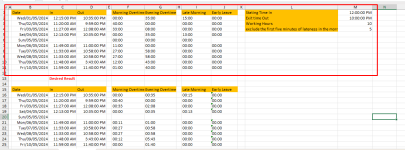
To get the desired Time format follow the steps below:
Press, CTRL+1 to get the Format Cells dialog box,
Then, select Custom >> types mm:ss for minute:second format. If you want to show hour:minute:second format use this h:mm:ss
Here is the Excel File:
Attachments
Dear Mrs. ShamimaritaHello Jululian,
I updated the Morning Overtime, Evening Overtime, and Late Morning formulas.
Morning Overtime: =IFNA(IF(C2<TIME(12,0,0), TIME(12,0,0)-C2, MAX(0, TIME(12,0,0)-C2-TIME(0,5,0))),"")
Evening Overtime: =IF(D2 < C2, D2 + 1 - TIME(22,0,0), IF(D2 > TIME(22,0,0), D2 - TIME(22,0,0), 0))
Late Morning: =IF(C2>TIME(12,0,0), C2-TIME(12,0,0),"00:00")
View attachment 1469
To get the desired Time format follow the steps below:
Press, CTRL+1 to get the Format Cells dialog box,
Then, select Custom >> types mm:ss for minute:second format. If you want to show hour:minute:second format use this h:mm:ss
Here is the Excel File:
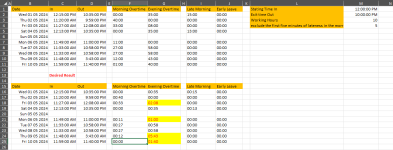
First of all, I would like to thank you for your time and interest in considering my inquiry. I have some notes marked in yellow if your time allows you to have a look
Regards
Attachments
Hello Jululian,Dear Mrs. Shamimarita
First of all, I would like to thank you for your time and interest in considering my inquiry. I have some notes marked in yellow if your time allows you to have a look
Regards
The formula is working fine. To match your desired output I used mm:ss time format earlier. Here, I used hh:mm time format now.
Please change the time format only.
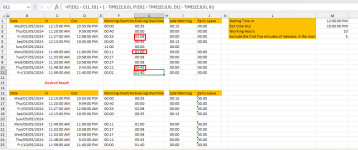
Here is the updated Excel File:
Attachments
Your help with this issue is greatly appreciated and has had a significant impact. thank youHello Jululian,
The formula is working fine. To match your desired output I used mm:ss time format earlier. Here, I used hh:mm time format now.
Please change the time format only.
View attachment 1473
Here is the updated Excel File:
Regards
You are most welcome. Thanks for your appreciation.Your help with this issue is greatly appreciated and has had a significant impact. thank you
Regards