Advance Filter using Macro or VBA

Nikhil Patki

New member
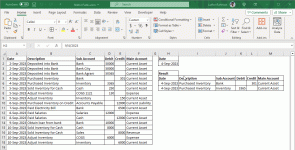
On same sheet where we have original ( main ) data
i'm trying to extract specific data based on criteria using advance filter feature on same sheet as original data exists
but on a different location from main data.
when i try to refresh it changing the criteria, macro only refresh the one column that is first.
 
On same sheet where we have original ( main ) data
i'm trying to extract specific data based on criteria using advance filter feature on same sheet as original data exists
but on a different location from main data.
when i try to refresh it changing the criteria, macro only refresh the one column that is first.
Hello Nikhil,

Thank you for posting your query on Exceldemy Forum. However, without examining how you have organized your data and utilized the advanced filter feature in conjunction with a VBA macro, it's not possible for us to offer a workable solution. Would you be able to provide a sample file for me to review so that I can better understand the issue and suggest a viable solution?

Regards
Aniruddah
Team Exceldemy
 
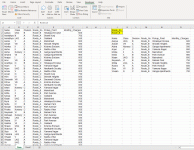
Dear Admin ! thank you for your reply.
kindly find attached file in which i'm trying to refresh advance filter
using macro recorder
Hello Nikhil Patki

Welcome to ExcelDemy Form. Thanks for reaching out and sharing your problem. You said you have a Macro that applies an advanced filter, but after changing the criteria and refreshing, the macro only refreshes the first column. You have to clear the contents of the previous destination range in the sheet named Data for your existing recorded macro to work properly.

I have developed another sub-procedure, ApplyAdvancedFilter, which will fulfil your goal of applying an advanced filter. Besides, I am presenting an Event procedure called the ApplyAdvancedFilter when we have changed criteria (When changing the criteria, we must change the criteria heading first.)

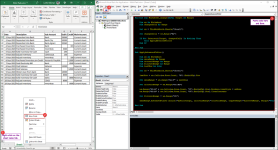
Step 1: Right-click on the sheet name tab => Click on View Code => Paste the following code in the sheet module => Save.
Code:
Private Sub Worksheet_Change(ByVal Target As Range)
  
    Dim ws As Worksheet
    Dim changedCell As Range

    Set ws = ThisWorkbook.Sheets("Sheet1")
  
    Set changedCell = ws.Range("H2")

    If Not Intersect(Target, changedCell) Is Nothing Then
        Call ApplyAdvancedFilter
    End If

End Sub

Sub ApplyAdvancedFilter()

    Dim ws As Worksheet
    Dim dataRange As Range
    Dim criteriaRange As Range
    Dim filteredRange As Range
    Dim lastRow As Long

    Set ws = ThisWorkbook.Sheets("Sheet1")
  
    lastRow = ws.Cells(ws.Rows.Count, "A").End(xlUp).Row
  
    Set dataRange = ws.Range("A1:F" & lastRow)

    Set criteriaRange = ws.Range("H1:H2")
  
    ws.Range("H5:M" & ws.Cells(ws.Rows.Count, "H").End(xlUp).Row).Borders.LineStyle = xlNone
    ws.Range("H5:M" & ws.Cells(ws.Rows.Count, "H").End(xlUp).Row).ClearContents

    Set filteredRange = ws.Range("H5")

    dataRange.AdvancedFilter Action:=xlFilterCopy, criteriaRange:=criteriaRange, CopyToRange:=filteredRange, Unique:=False

End Sub
Paste the given code in the sheet module and Save.png​

Step 2: Return to Sheet1 and make desired changes to see the output like the following GIF.
Output of using the given sub-procedure and event procedure.gif​

Things to remember:
When using a date as a criterion, ensure both source and criteria in the date format are the same.

I am also attaching the solution workbook for better understanding. Good luck.

Regards
Lutfor Rahman Shimanto
 

Attachments

Last edited:
Dear Admin ! thank you for your reply.
kindly find attached file in which i'm trying to refresh advance filter
using macro recorder
Dear Nikhil Patki

Thanks for sharing your dataset. I have modified my previous code in such a way that you can use it in your workbook.

Likewise, paste the following code into the sheet (Data) module and save the workbook.

Sub-procedure & Event Procedure:
Code:
Private Sub Worksheet_Change(ByVal Target As Range)
    
    Dim ws As Worksheet
    Dim changedCell As Range

    Set ws = ThisWorkbook.Sheets("Data")
    
    Set changedCell = ws.Range("J2")

    If Not Intersect(Target, changedCell) Is Nothing Then
        Call ApplyAdvancedFilter
    End If

End Sub

Sub ApplyAdvancedFilter()

    Dim ws As Worksheet
    Dim dataRange As Range
    Dim criteriaRange As Range
    Dim filteredRange As Range
    Dim lastRow As Long

    Set ws = ThisWorkbook.Sheets("Data")
    
    lastRow = ws.Cells(ws.Rows.Count, "A").End(xlUp).Row
    
    Set dataRange = ws.Range("A1:F" & lastRow)

    Set criteriaRange = ws.Range("J1:J2")
    
    If ws.Cells(ws.Rows.Count, "J").End(xlUp).Row > 2 Then
        ws.Range("J4:O" & ws.Cells(ws.Rows.Count, "J").End(xlUp).Row).Borders.LineStyle = xlNone
        ws.Range("J4:O" & ws.Cells(ws.Rows.Count, "J").End(xlUp).Row).ClearContents
    End If

    Set filteredRange = ws.Range("J4")

    dataRange.AdvancedFilter Action:=xlFilterCopy, criteriaRange:=criteriaRange, CopyToRange:=filteredRange, Unique:=False

End Sub

OUTPUT:
Output of using the given sub-procedure and event procedure.gif
​
Hopefully, the idea will help you. Good luck.

Regards
Lutfor Rahman Shimanto
 
Really Thank you Admin.
I've copied your code in my sheet and modified the range as actual.
It's working.

But still there is one problem.
as when i clear all filtered data manually
and press the macro assigned button / shape
initially it clears the criteria and brings all data.
secondly after data + criteria is cleared
and I use macro assigned button, it clear evens criteria heading
later when i input values in the cell it provides the filtered data without hassle.
everything is working fine. Only i'm unable to understand why after filtered data range is cleared
1. why it clears the criteria ( cell H2 ) on using macro assigned button
2. later again after clearing data, why it clears even header also of criteria ( cell H1 )
 
Really Thank you Admin.
I've copied your code in my sheet and modified the range as actual.
It's working.
Hello Nikhil Patki

You are welcome. Your appreciation means a lot to us. We are always here for your Excel & VBA-related queries and many more.

According to your dataset, I have developed an Event Procedure and a Sub-procedure. I am glad to hear that it is working fine for your dataset.

Regards
Lutfor Rahman Shimanto
 
Really Thank you Admin.
I've copied your code in my sheet and modified the range as actual.
It's working.

But still there is one problem.
as when i clear all filtered data manually
and press the macro assigned button / shape
initially it clears the criteria and brings all data.
secondly after data + criteria is cleared
and I use macro assigned button, it clear evens criteria heading
later when i input values in the cell it provides the filtered data without hassle.
everything is working fine. Only i'm unable to understand why after filtered data range is cleared
1. why it clears the criteria ( cell H2 ) on using macro assigned button
2. later again after clearing data, why it clears even header also of criteria ( cell H1 )
Dear Nikhil Patki

You probably worked on modifying the first sub-procedure I developed earlier (before sharing your dataset) based on a dataset I created to demonstrate your problem. After sharing your dataset, I have modified the sub-procedure that is currently working for your dataset.

Several reasons exist for my previous sub-procedure malfunction when working with your shared dataset. In my demonstrated dataset, a cell displays "Result," and filter data are displayed after that row. In my previous sub-procedure, when clearing previously filtered data, it calculates the last row of column H. If you manually clear the previously filtered values, you do not have another non-empty cell like my demonstrated dataset, and the sub-procedure will clear the heading.

So, please use the sub-procedure which I developed for your dataset. You can also assign it in a button or any shape. Good luck!

Regards
Lutfor Rahman Shimanto
 
Dear Nikhil Patki

Thanks for sharing your dataset. I have modified my previous code in such a way that you can use it in your workbook.

Likewise, paste the following code into the sheet (Data) module and save the workbook.

Sub-procedure & Event Procedure:
Code:
Private Sub Worksheet_Change(ByVal Target As Range)
   
    Dim ws As Worksheet
    Dim changedCell As Range

    Set ws = ThisWorkbook.Sheets("Data")
   
    Set changedCell = ws.Range("J2")

    If Not Intersect(Target, changedCell) Is Nothing Then
        Call ApplyAdvancedFilter
    End If

End Sub

Sub ApplyAdvancedFilter()

    Dim ws As Worksheet
    Dim dataRange As Range
    Dim criteriaRange As Range
    Dim filteredRange As Range
    Dim lastRow As Long

    Set ws = ThisWorkbook.Sheets("Data")
   
    lastRow = ws.Cells(ws.Rows.Count, "A").End(xlUp).Row
   
    Set dataRange = ws.Range("A1:F" & lastRow)

    Set criteriaRange = ws.Range("J1:J2")
   
    If ws.Cells(ws.Rows.Count, "J").End(xlUp).Row > 2 Then
        ws.Range("J4:O" & ws.Cells(ws.Rows.Count, "J").End(xlUp).Row).Borders.LineStyle = xlNone
        ws.Range("J4:O" & ws.Cells(ws.Rows.Count, "J").End(xlUp).Row).ClearContents
    End If

    Set filteredRange = ws.Range("J4")

    dataRange.AdvancedFilter Action:=xlFilterCopy, criteriaRange:=criteriaRange, CopyToRange:=filteredRange, Unique:=False

End Sub

OUTPUT:
Hopefully, the idea will help you. Good luck.

Regards
Lutfor Rahman Shimanto
It was really grateful of you. Now it's working totally fine as expected.
 
I have one more query.
I'm attempting to build a attendance muster
This includes multiple sheets -
1. Employee Record which will have all employee list even if someone has left and few are newly added
2. Active Employee which contains only active employees and not have employees who have left
3. Muster which contain their monthly attendance
4. Salary record which contains only employee basic details and their salary details for that month
5. Salary Slip. this sheet has been modified such as only employee code can be selected and rest data fields are set using vlookup and direct link
in such a way that when employee code is changed it automatically updates all fields showing selected employees salary details in the set format

Now I've only two issues
1. to get data filtered in sheet 2 as per the criteria " active " from sheet 1
but i want only selective headers to arrive and not all headings
as sheet 4 data is linked from sheet 2

2. in sheet 5 i want Two buttons activated having macro
One for Print the salary slip which is manageable with my knowledge - one at a time
but Second button to generate pdf using employee name.

as employee data will be changing multiples time in year
and my knowledge being of basic level
i can't have all employee's salary slip generated from salary sheet, as well as their slips pdf generated or printed in one click
 
You are most welcome. Glad to hear that this solution helped you. Keep exploring Excel with ExcelDemy!
 
This usually happens because the AdvancedFilter range is defined as a single column instead of the full data range, make sure your Range for AdvancedFilter includes all required columns, and that the CopyToRange spans the full output area, not just the first column.
 
Last edited:
Hi Lucasj,

Yes, this can be done with VBA using the Advanced Filter. You don’t need to loop through the data row by row. The idea is to create a small criteria range (can be on another sheet or a hidden area) and then apply Range.AdvancedFilter in VBA.

In VBA, you would:
  • Define the source range
  • Define the criteria range
  • Use AdvancedFilter with either xlFilterInPlace or xlFilterCopy
This approach is fast, dynamic, and works well even for large datasets. If your criteria change, you only update the criteria cells, no need to rewrite the macro.

If you want, you can also make the criteria range fully dynamic by writing values into it from VBA before running the filter.
 
Lucas,
Actually, the implementation of the AdvancedFilter feature in the VBA code will definitely resolve your problem. The main advantage of using this feature is the absence of the loop, which means the increase in the macro execution speed.

The procedure for the solution may consist of the following actions:
- Selection of the range to filter;
- Determination of the criteria range (criteria range can even be specified in the other worksheet of the same workbook);
- Application of the Range.AdvancedFilter method with the parameter like xlFilterInPlace or xlFilterCopy.
pikashow
The main advantage of such approach is the fact that the criteria do not have to be changed in the VBA code, as you only have to change the criteria range.

Additionally, the criteria range can be dynamic and can be changed in VBA.
 
But also this is a helpful discussion for anyone working with Excel VBA and advanced filtering. I like how practical these forum threads can be, especially when you're trying to solve a specific problem and want to compare different approaches. The examples and community experience make topics like macros and filtering much easier to understand and apply in real-world spreadsheets. sassa status check
 
Если ты пришел за ссылками - они ниже.

# Как зайти на блэкспрут маркет Красноярск ? Инструкции 2026

блэкспрут маркет - это торговая площадка необычных и натуральных Ништяков. Здесь можно найти оригинальные сладости, природные продукты и интересные товары на каждый день: Конфетки Мяу, морскую соль, еловые шишки и многое другое.

## Что продаётся на блэкспрут маркет

Ассортимент маркетплейса объединяет товары, которые отличаются натуральностью и необычной подачей. Среди популярных категорий:

- Конфетки Мяу - оригинальное угощение для любителей сладкого;
- натуральная морская соль для приготовления разных блюд;
- ароматные еловые шишки;
- природные продукты и полезные Ништяки;
- необычные подарки для друзей и близких.

На блэкспрут маркет удобно выбирать товары для себя, дома или в подарок. В карточках размещаются описания, фотографии, состав и другая информация, помогающая определиться с покупкой.

## Как зайти на блэкспрут маркет Красноярск

Чтобы открыть маркетплейс, найдите официальный сайт блэкспрут маркет через поисковую систему или воспользуйтесь сохранённой ссылкой. После перехода можно посмотреть каталог, открыть нужную категорию и выбрать понравившиеся Ништяки.

Порядок действий понятный:

1. Откройте официальный сайт блэкспрут маркет .
2. Перейдите в каталог товаров.
3. Выберите Конфетки Мяу, морскую соль, еловые шишки или другие продукты.
4. Добавьте товары в корзину.
5. Укажите данные для получения заказа.
6. Выберите доступный способ оплаты и доставки.

Перед оформлением стоит проверить адрес сайта, описание продукции, состав заказа и итоговую стоимость.

### Рабочие ссылки на блэкспрут маркет

1. Основной сайт - https://blspr.live/
2. Резервное зеркало - https://sprut.dark-link.top
3. Onion-ссылка - http://bsprutra7wqs3ypzw4hxl2zo4qtw4nrvgdu2t4sp7etmqzbaiekjqeyd.onion/
4. Tor Browser - https://www.torproject.org/download/
5. Резервная статья - прокладка на sprut3 - === Дополнительный материал проекта sprut3 (прокладка) ===
15 Q - суть ответов
Сохраните main и reserve; при блокировке clearnet используйте onion.
Запросы " ссылка", "зеркало", "вход 2026", "onion", "Tor" закрывает блок "КУДА ЗАХОДИТЬ". Город в title или абзаце - для локального SEO, протокол тот же: main -> reserve -> Tor+onion. Регистрация на главной, пароль не с почты. Каталог: соль после auth.
5) EXTRA ARTICLE -
Сохраните main и reserve; при блокировке clearnet используйте onion.
Каталог текстом
Расширенные статьи лежат в папке sprut3 на рабочем столе.
Один аккаунт на main, reserve и onion; пароль храните отдельно от ссылок.
Расширенные статьи лежат в папке sprut3 на рабочем столе.
Поваренная соль: мешок, пачка, крупность - в карточке. Сосновые шишки: декор, аромат - смотреть фото. Цифровые позиции - по правилам площадки. Сравните три предложения, не одно. Навигация внутри быстрее внешнего поиска "купить соль blacks...".
КУДА ЗАХОДИТЬ
На все формулировки ответ один: адреса из блока, onion в Tor, регистрация на проверенном домене. Не ищите новый URL под каждый вопрос. Соль и шишки - после входа, не на лендингах из выдачи.
Нужен ? Сохраните main и reserve, Tor для onion. Регистрация на сайте, пароль отдельный. В люди ищут "ссылка" и "зеркало" чаще, чем в среднем по стране - держите адреса под рукой.
Один аккаунт на main, reserve и onion; пароль храните отдельно от ссылок.
Продолжение инструкции sprut3: зеркала, Tor, onion, регистрация.
Ниже - фрагменты расширенной инструкции; полный набор статей в каталоге sprut3.
4) TOR BROWSER -
Продолжение инструкции sprut3: зеркала, Tor, onion, регистрация.
Я записал в заметку, какой пункт сработал - main или reserve - чтобы в следующий раз не гадать. Onion оставил только для Tor. Extra article прочитал, когда main на минуту лёг, но login делал на сайте. Так история про заканчивается практикой, а не теорией.


Onion-ссылка открывается только через Tor Browser. Перед входом внимательно проверьте адрес страницы.

## Почему покупателям нравится блэкспрут маркет

Главная особенность площадки - необычный ассортимент. Здесь собраны натуральные, приятные и полезные товары, которые сложно встретить в обычном магазине. Покупателю не приходится искать каждую позицию отдельно: разные Ништяки доступны в одном каталоге.

К преимуществам маркетплейса относятся:

- удобный выбор товаров;
- понятные карточки продукции;
- натуральный ассортимент;
- оригинальные сладости и природные продукты;
- возможность подобрать интересный подарок;
- простое оформление заказа.

блэкспрут маркет подходит тем, кто ценит натуральность, любит пробовать новое и хочет радовать себя необычными покупками.

## блэкспрут маркет Красноярск и кефворд

Запрос «блэкспрут маркет Красноярск » может использоваться для поиска информации о доступности товаров и доставки в конкретный населённый пункт. Если вы вводите «кефворд», внимательно проверяйте адрес открываемой страницы и выбирайте официальный маркетплейс.

В 2026 году блэкспрут маркет остаётся популярной площадкой для покупки Конфеток Мяу, морской соли, еловых шишек и других натуральных Ништяков. Это интересный маркетплейс с необычным ассортиментом, понятным каталогом и товарами, способными сделать обычный день немного приятнее.
 

Online statistics

Members online
6
Guests online
254
Total visitors
260

Forum statistics

Threads
480
Messages
2,255
Members
5,175
Latest member
kimera
Back
Top